Interactive video ads are changing how brands connect with audiences. These ads engage viewers directly through clickable hotspots, polls, quizzes, and shoppable links, making them more effective than traditional formats. Here’s why they work:
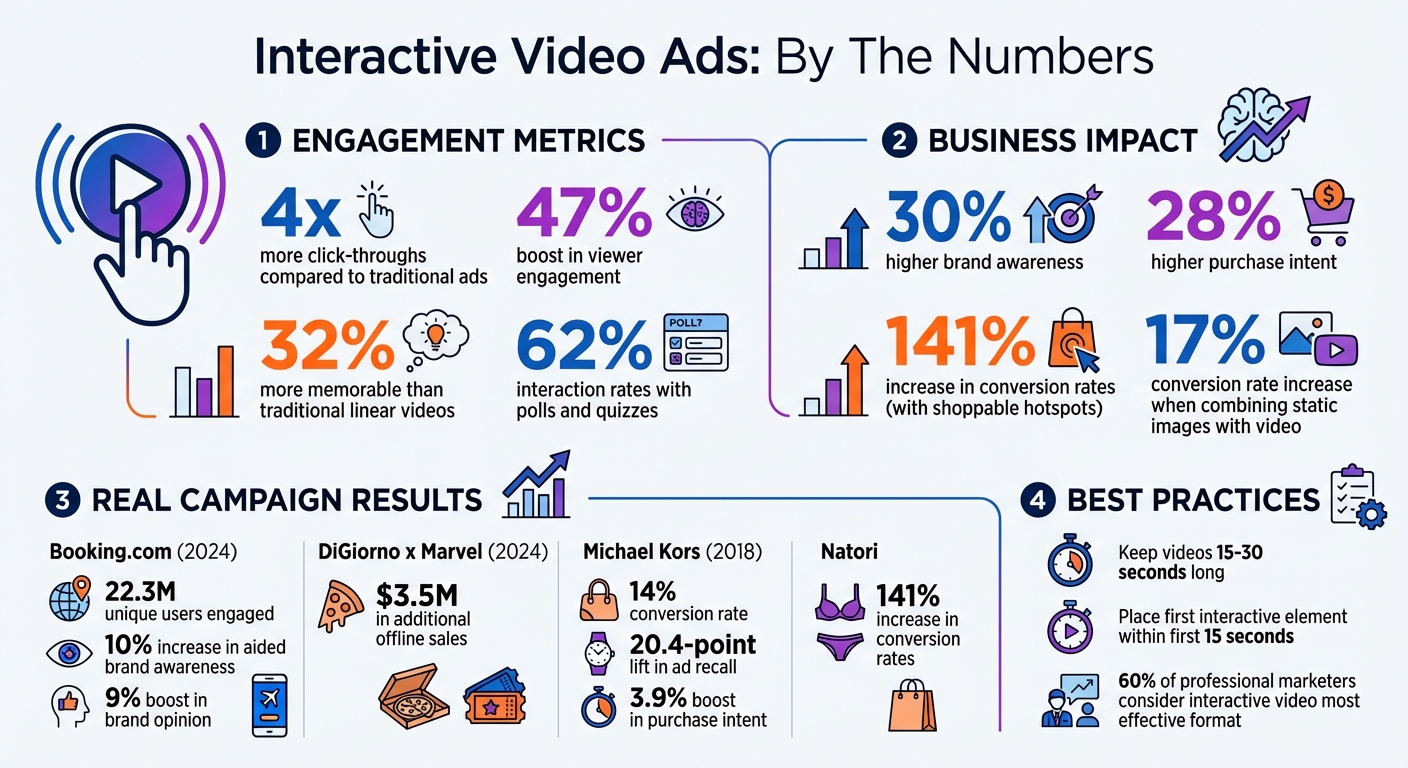
- Higher Engagement: Interactive ads see 4x more click-throughs and a 47% boost in viewer engagement.
- Better Results: They drive 30% higher brand awareness and 28% higher purchase intent.
- Proven Success: Campaigns like DiGiorno‘s partnership with Marvel Studios in 2024 generated $3.5M in additional offline sales.
Want to create successful interactive ads? Start by setting clear goals, such as raising awareness, capturing leads, or driving sales. Match the right features (like 360° views or shoppable tags) to your objectives, and track metrics like CTR, dwell time, and conversions. Keep designs simple, prioritize mobile optimization, and test elements like CTAs and video lengths. Data from user interactions can also help refine future campaigns and improve retargeting efforts.
Interactive video ads aren’t just ads – they’re experiences. By combining creativity with data, your campaigns can deliver measurable results and keep audiences engaged.
Interactive Video Ads Performance Statistics and Benefits
Set Clear Campaign Goals
Before diving into creating an interactive video ad, take a step back and define your objectives. Without a clear purpose, it’s nearly impossible to choose the right features or gauge whether your campaign is hitting the mark. Your goals act as the foundation for everything – from the type of interactions you include to the metrics you analyze afterward.
Different goals call for different strategies. For instance, if your focus is on brand awareness, consider features like 360-degree videos or branching narratives. These formats are highly engaging, with interactive ads driving a 47% increase in viewer engagement compared to traditional ones. On the other hand, if lead generation is your aim, quizzes, polls, or embedded lead forms can capture user information directly within the video. For campaigns centered on sales, features like shoppable hotspots or "Add to Cart" buttons provide a seamless path to purchase, boosting conversion rates by a whopping 141%.
Match Interactive Features to Your Goals
Your choice of interactive elements should align directly with your campaign’s purpose. For educational efforts, clickable hotspots that reveal product details or tutorials work well. If engagement is the priority, formats like choose-your-own-adventure ads allow viewers to shape the narrative, keeping them invested. Don’t underestimate the power of in-video CTAs either – they generate 4x more click-throughs than placing the same CTA on a landing page. To maximize their effect, position them strategically, ideally within the first 15 seconds of your video.
Choose the Right Success Metrics
Once your goals are set, determine the specific metrics you’ll track to measure progress. For brand awareness, keep an eye on dwell time, brand recall, and completion rates. If conversions are your focus, monitor click-through rates (CTR), sales volume, and cost per acquisition. For lead generation, measure the number of leads captured and form completions. Defining these KPIs upfront ensures you can assess your campaign’s performance accurately and make informed adjustments for future efforts.
With clear objectives and measurable metrics in place, you can confidently design interactive elements that align with your goals.
sbb-itb-6893d99
Design Interactive Elements That Work
Creating interactive elements that genuinely engage your audience is all about balance. They need to feel natural to the platform and easy to use – otherwise, you risk leaving viewers confused or frustrated.
Use Platform-Specific Features
Each social platform comes with its own set of tools and features, so your interactive elements should match the environment where your ad will appear. For instance:
- Instagram and TikTok: Shoppable product tags and interactive stickers (like polls or quizzes) are built right into the experience, making engagement smooth and intuitive.
- YouTube: Tools like auto end screens, call-to-action buttons, and product feeds from Merchant Center allow users to take action – like shopping or learning more – without leaving the video.
- Facebook: Clickable links and Canvas experiences offer immersive, full-screen formats that deepen engagement.
Real-world campaigns highlight how effective these features can be. Between May 2 and June 10, 2024, Booking.com ran the "Travel the Screen" campaign on Prime Video alongside the movie The Idea of You. This interactive experience let 22.3 million unique users click on cities featured in the film, leading to a 10% increase in aided brand awareness and a 9% boost in brand opinion. Similarly, in September 2024, DiGiorno teamed up with Marvel Studios for a Deadpool & Wolverine campaign using interactive video ads across Prime Video and IMDb, generating $3.5 million in additional offline sales.
The type of interaction you choose can make or break the experience. For example:
- Clickable hotspots: These let viewers explore product details without interrupting the video.
- Polls and quizzes: These invite active participation, with interaction rates reaching up to 62%.
- Shoppable product tags: These simplify the buying process, allowing users to view details and make purchases directly within the ad.
- Branching narratives: For storytelling campaigns, these let viewers influence the story, creating a personalized and memorable experience.
Timing is everything. Place your first interactive element within the first 15 seconds to signal to viewers that this ad is interactive – not just something to passively watch.
Keep the Structure Simple
Simplicity is the secret sauce. Viewers shouldn’t have to guess what’s clickable or struggle with overly complex interfaces. Use clear, tappable buttons with straightforward labels like "Tap to shop" or "Choose your path." And don’t overwhelm users with too many choices at once.
"Small Screen & Big Fingers don’t always mix – when in doubt, make your buttons bigger than you think they should be." – Idomoo Academy
Make sure buttons are large enough for easy tapping on mobile devices and spaced out to prevent accidental clicks. Smooth transitions – like subtle fades or animations – can help maintain the viewer’s focus as they move through interactive points. For time-sensitive decisions, adding a countdown timer (around 5 seconds) can guide users without creating unnecessary pressure.
Keeping layouts clean and intuitive ensures viewers stay engaged with your message, not distracted by confusing technology. Once users interact even once, they’re far more likely to stick around and explore more.
Optimize for Mobile Viewing
Interactive features are great for boosting engagement, but they need to work seamlessly on mobile devices since that’s where most viewers consume content. In fact, the majority of viewers are on their phones, and their attention peaks within the first three seconds of watching a video. If you don’t grab their interest immediately, they’ll likely scroll right past.
"Because attention peaks in the first three seconds, users often move on soon after, so you need to communicate your main message instantly." – Rocket Lab
To keep mobile users engaged, design your videos to work even when muted. Use text overlays, captions, and high-contrast graphics, as many people watch videos in public spaces with the sound off. Additionally, make sure your videos load quickly by compressing files and using CDNs (Content Delivery Networks). A slow-loading video is practically an invitation for viewers to scroll away.
Keep Videos Between 15-30 Seconds
Mobile users have short attention spans, so shorter videos perform better. Aim for videos that are 15 to 30 seconds long – this length not only holds attention but also significantly improves completion rates. Longer videos risk losing viewers before they even get to your call to action. For skippable ads, such as mid-roll or pre-roll formats, you often only reach about 10% of your audience. Every second counts, so make it impactful.
If you’re creating interactive videos, introduce the first choice point within the first 15 seconds. This quickly turns passive viewers into active participants, keeping them engaged.
Use Vertical or Square Formats
Choosing the right video format can make a huge difference on mobile. Vertical (9:16) and square (1:1) formats dominate the screen, reducing distractions and making the visuals pop. Horizontal videos, on the other hand, often leave black bars above and below, wasting valuable screen space.
| Format | Aspect Ratio | Best For |
|---|---|---|
| Portrait/Stories | 9:16 | Instagram/Facebook Stories, TikTok |
| Vertical | 4:5 | Facebook/Instagram Feeds |
| Square | 1:1 | Feeds, In-Stream Videos |
| Landscape | 16:9 | YouTube, Desktop |
When adding interactive elements like buttons or hotspots, make sure they’re large enough for easy tapping and spaced out to avoid accidental clicks. Clear touch indicators, like visual cues or animations, can guide users on how to interact with your ad. These small design tweaks can make a big difference in keeping viewers engaged and clicking.
Use Data for Personalization and Retargeting
Once you’ve set clear goals and crafted engaging ads, the next step is to leverage data to refine your strategy and drive conversions. User interactions within your videos can provide a goldmine of insights into their preferences. Did you know that interactive video content is 32% more memorable than traditional linear videos?[^22] That boost in memorability likely comes from the immersive experience of giving viewers control, making your message stick and resonate more effectively. Use this data to sharpen your targeting efforts.
Interactive features like quizzes, polls, or branching paths are especially revealing. For instance, if a viewer clicks on a hotspot for "running shoes", they’re signaling a clear interest. With this information, you can tailor future video content to showcase products or topics that align with their preferences. It’s no surprise that 60% of professional marketers consider interactive video the most effective format for video marketing[^22], as it delivers real-time insights into user behavior.
Adjust Content Based on User Behavior
Interactive elements such as hotspots, quizzes, or branching paths don’t just engage viewers – they tell you exactly what they’re interested in. If someone selects "beginner workout plans", for example, you can follow up with ads focusing on foundational fitness tips or entry-level products.
A great example of this approach comes from Michael Kors. In 2018, they launched a Facebook AR interactive ad for their "Lon" aviator sunglasses, letting users virtually try on the glasses and shop directly within the app. The results? A 14% conversion rate, a 20.4-point lift in ad recall, and a 3.9% boost in purchase intent[^22]. This campaign shows how personal interaction combined with engagement data can lead to measurable success.
To take things a step further, consider integrating product feeds from platforms like Google Merchant Center. This ensures that your interactive videos reflect real-time product availability and pricing, creating a seamless and relevant shopping experience[^4][^11].
Retarget Users Who Engaged
Once you’ve optimized your personalized content, shift your focus to retargeting strategies. Not every interaction will lead to an immediate conversion, but engaged users are far more likely to convert than those unfamiliar with your brand. The key is to design retargeting campaigns that directly address the actions they’ve taken.
Segment your audience based on engagement levels – such as those who watched 25%, 50%, or 75% of your video, or clicked on specific elements but didn’t make a purchase[^23]. For instance, if someone clicked on a product without completing the purchase, follow up with a video featuring customer testimonials or a limited-time discount to ease their hesitation.
Vital Proteins demonstrated this effectively by partnering with Reddit’s KarmaLab for an interactive "Ask Me Anything" session about collagen peptides. The session generated over 150 audience questions and became the top-performing asset of their awareness campaign[^22]. They then retargeted engaged users with product-specific videos based on the questions asked, guiding curious viewers toward making a purchase.
For users who abandoned their carts, urgency can be a powerful motivator. Retarget them with videos highlighting limited-time offers or emphasizing the benefits they might miss out on[^23]. To recapture attention, make sure your follow-up videos grab viewers within the first three seconds[^23]. Since it often takes multiple touchpoints to convert a potential customer, consider running a sequence of videos across platforms like YouTube, Instagram, and the Google Display Network. This keeps your brand visible without overwhelming your audience.
Test and Refine Your Ads
Creating an interactive video ad is just the beginning. To make it truly effective, you need to test and tweak it regularly. These ads generate detailed insights, showing what grabs attention and how viewers engage, which helps you fine-tune for better results.
Let’s look at how to test and optimize these interactive features.
Run A/B Tests on Key Elements
A/B testing is a great way to see what works best. Start with calls-to-action (CTAs) – experiment with the wording, placement, and style. For instance, a simple "Shop Now" might perform better than "Learn More" in a product-focused campaign.
You can also test different video lengths. Ads between 15–30 seconds tend to work well, but timing matters too – make sure the first interaction happens within the first 15 seconds to keep viewers engaged.
Try out various interactive features like quizzes, clickable hotspots, or polls. Don’t forget to test visual elements too, such as hand animations, text overlays, or even changing the video’s orientation. Using multi-touch attribution during testing can help reveal how much each feature contributes to the ad’s success.
Track Performance Metrics
Once you’ve tested your creative elements, focus on the numbers to see how they’re performing. Key metrics include:
- Engagement rate: This shows how many viewers interact with your ad. If it’s low, the interactive elements might be too complicated.
- Dwell time: A short dwell time could mean your ad isn’t holding attention.
Pay attention to video completion rates at different milestones – 25%, 50%, 75%, and 100%. High drop-off rates can help you pinpoint where viewers lose interest. If people engage but don’t convert, it might be time to rethink your final CTA. Adjusting the video length or redesigning the CTA can also boost completion and click-through rates.
Finally, keep an eye on financial metrics like ROAS (Return on Ad Spend), CPA (Cost Per Acquisition), and LTV (Lifetime Value). For example, combining static images with video has been shown to increase conversion rates by 17%. Use these insights to make ongoing, data-driven improvements.
Conclusion
Interactive video ads succeed when strategy and execution are in sync. Start by setting clear objectives – whether you’re aiming for brand awareness, lead generation, or direct sales – and ensure your interactive features align with these goals. Research shows that interactive video ads can boost the time spent with a brand by 47% compared to non-interactive formats, making the extra effort well worth it.
Since most people view these ads on their smartphones, mobile optimization is crucial. Use vertical or square formats, incorporate touch-friendly buttons, and ensure your videos load quickly to provide a seamless experience.
Design plays a huge role, too. Every interactive element should have a clear purpose, like a clickable hotspot leading to a purchase. Keep the structure simple with clear labels and limited options to avoid overwhelming viewers. Even when users don’t engage with the interactive features, these ads still outperform traditional formats in terms of engagement.
Take advantage of the data generated by your interactive ads to fine-tune your approach. Monitor metrics like engagement rates, dwell time, and conversions to see what’s working. A/B testing is your friend – experiment with calls-to-action, video lengths, and interactive features to find the best-performing combinations. Brands like Natori, which achieved a 141% increase in conversion rates, demonstrate the power of testing and continuous improvement.
FAQs
What makes interactive video ads more engaging than traditional ads?
Interactive video ads bring a fresh twist to traditional advertising by turning passive viewers into active participants. With features like clickable options, gamified elements, and personalized storylines, these ads grab attention and hold it longer than standard video content.
Studies reveal that interactive ads are up to 32% more memorable and generate much higher engagement compared to typical linear video ads. This kind of interaction doesn’t just improve recall – it motivates viewers to take meaningful actions, making interactive ads a game-changer for social media campaigns.
What metrics should you track to measure the success of interactive video ads?
To measure how well your interactive video ads are performing, keep an eye on metrics that highlight engagement, conversion, and efficiency. Here are some key ones to track:
- View-through rate: This shows the percentage of users who start watching your video.
- Completion rate: Tracks how many viewers stick around until the end or reach the final interactive element.
- Interaction rate: Measures how many users engage with features like buttons, polls, or product links.
- Click-through rate (CTR): The number of clicks on your call-to-action.
- Conversion rate: The percentage of interactions that lead to a specific action, like making a purchase or signing up.
- Return on ad spend (ROAS): Calculates the revenue generated compared to your total ad spend.
Pick the metrics that align with your campaign’s goals – whether it’s boosting brand awareness, generating leads, or driving sales. Tracking these numbers will give you valuable insights into what’s working and help you find areas to improve for even better results.
What are the best practices for optimizing interactive video ads for mobile devices?
To craft engaging interactive video ads for mobile devices, keep these practical tips in mind:
- Design for smaller screens: Opt for vertical (9:16) or square (1:1) formats that naturally fit phone displays. Make sure any text is large enough to be easily readable, even on screens as small as 5 inches.
- Keep it short and lightweight: Compress your videos to avoid buffering issues. Stick to 6–15 seconds for non-skippable ads and up to 30 seconds for skippable ones. Be sure to deliver your main message within the first 3 seconds.
- Plan for silent playback: Since many users watch videos without sound, rely on strong visuals to tell your story. Add subtitles or captions to ensure spoken content is accessible.
- Make interaction effortless: Place tappable elements, like buttons or polls, where they’re easy to reach with one hand. Use clear and intuitive visual cues to guide users toward action.
- Test on multiple platforms: Preview your ads on platforms like Instagram, TikTok, and YouTube Shorts to ensure they display and function smoothly.
Following these guidelines will help you create mobile-friendly ads that grab attention, encourage interaction, and resonate with U.S. audiences.