Finding where to stream a movie or show can be a hassle when juggling multiple subscriptions. Instead of manually searching each app, use cross-platform search tools like Reelgood or JustWatch.
These tools let you type in a title and instantly see where it’s available, whether it’s free, part of your subscription, or requires a rental fee. They also offer features like unified watchlists, pricing comparisons, and alerts for expiring content.
Key Points:
- Search Across 100+ Platforms: Tools scan services like Netflix, Hulu, Disney+, and free options like Tubi.
- No Login Needed: Simply select your subscribed services to filter results.
- Save Time & Money: Avoid unnecessary rentals and locate content faster.
- Extra Features: Create watchlists, get alerts, and track shows across all devices.
Universal search tools simplify streaming, ensuring less time searching and more time watching.
How Universal Streaming Search Works
What These Search Tools Do
Universal streaming search tools operate by keeping a close eye on a wide range of streaming platforms. For instance, Yidio uses automated crawlers to monitor content on major services like Netflix, Apple TV, Hulu, Amazon, and more than 100 other providers. These bots gather data on availability, access points, and pricing.
Once the data is collected, tools like Reelgood step in with their proprietary algorithms. They process and organize this information into a single, searchable database, creating a seamless user experience. As Reelgood describes it:
“We gather data from every available data source on the internet and then our advanced algorithms clean, combine, and ensure accuracy to present it all to you in one friendly, easy-to-use interface that deeplinks to the right place every time.”
When you search for a title, these tools provide deep links, skipping the streaming service’s home screen and taking you straight to the specific movie or show page. They also combine content from subscription services, free ad-supported platforms like Tubi, and rental options like iTunes into one easy-to-navigate interface.
Limitations and Regional Differences
While these tools are convenient, they do have their limits. Licensing agreements mean that a show available on Netflix in the U.S. might not be available in Canada or the UK. To get accurate results, make sure to set your region correctly in the tool’s settings.
Additionally, not all streaming services are covered by every tool. Yidio tracks over 100 platforms, while Reelgood monitors anywhere from 150 to 300. Because streaming rights often shift – frequently at the start of a new month – some listings may occasionally be outdated if a title has left a platform.
Privacy and Account Connections
Most universal search tools don’t require direct access to your streaming accounts. Instead, you simply select the services you subscribe to, like Netflix, Hulu, or Disney+, and the tool filters results based on your preferences without needing to log in or access your viewing history.
For extra features, such as tracking your favorite shows or syncing watchlists, you may need to allow notification permissions. These alerts can notify you when new episodes are released or when a movie becomes available on one of your subscribed services. Additionally, some tools use your device’s location to provide accurate regional results and enable direct links into apps on your phone or TV.
Setting Up a Cross-Platform Search Tool
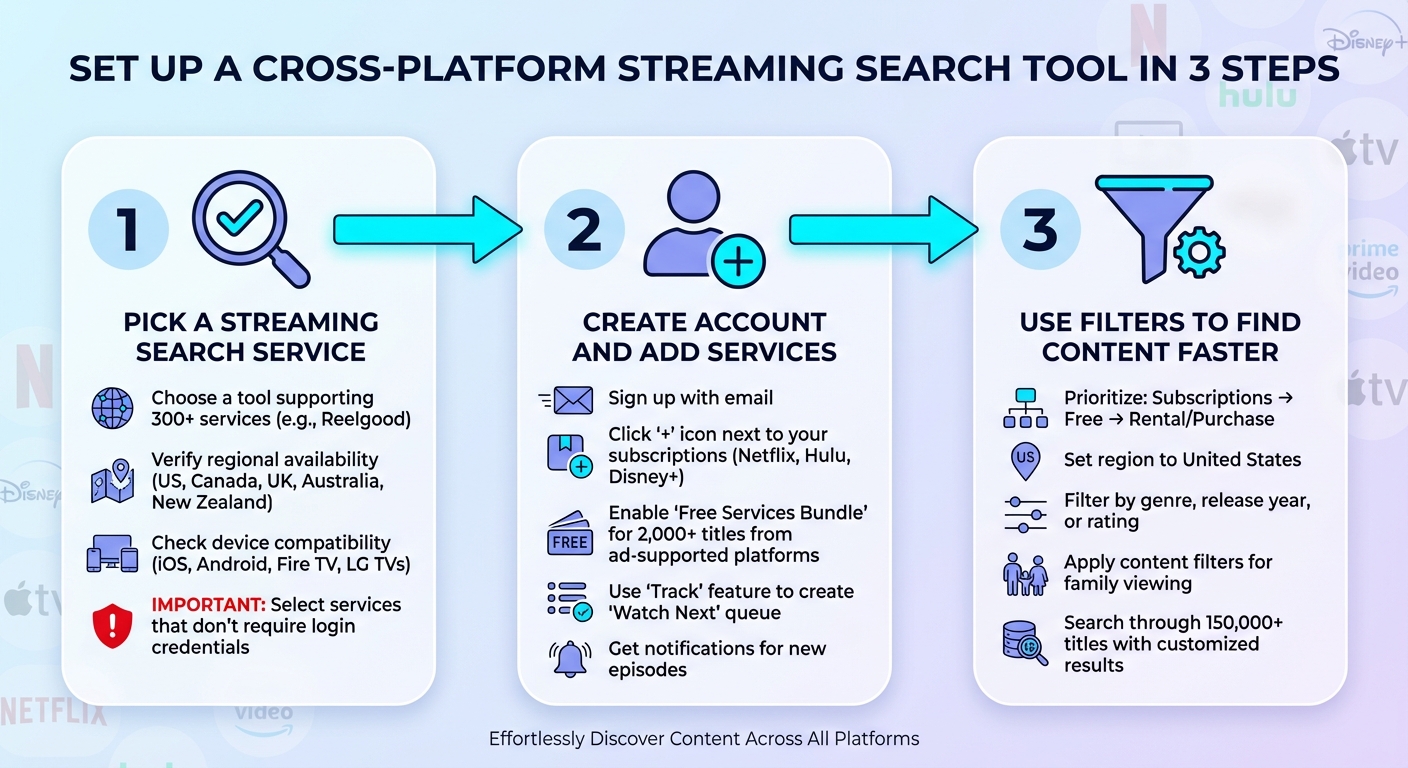
How to Set Up Cross-Platform Streaming Search in 3 Steps
Picking a Streaming Search Service
Start by selecting a search tool that works with your streaming platforms. For instance, Reelgood connects with over 300 services and catalogs more than 150,000 TV shows and movies.
When exploring your options, make sure the tool is available in your region – Reelgood currently supports users in the US, Canada, UK, Australia, and New Zealand. It’s also worth checking whether the tool has apps for your devices, such as iOS, Android, Fire TV, or LG TVs. Most importantly, opt for a service that doesn’t ask for your streaming account login credentials. This ensures your accounts stay safe. Once you’ve picked your tool, go ahead and set up your account and link your subscriptions.
Creating Your Account and Adding Services
After selecting your tool, create an account using your email. Navigate to the “Services” section and click the “+” icon next to the platforms you subscribe to, like Netflix, Hulu, or Disney+. The tool will confirm your subscriptions without requiring your login information.
You can also enable the “Free Services Bundle”, which adds over 2,000 titles from ad-supported platforms like FOX, ABC, and Crackle, giving you even more options. Once your services are added, use the “Track” feature to mark the shows you’re watching. This will create a “Watch Next” queue and send you notifications when new episodes are available.
Using Filters to Find Content Faster
With your account set up, take advantage of filters to streamline your searches. Prioritize your results by subscription services first, followed by free options, and then rental or purchase choices – this can help you avoid unnecessary costs.
Adjust your regional settings to the United States to ensure the content availability matches your area. You can also filter by genre, release year, or rating to quickly narrow down your options. If you’re watching with family, some tools even offer content filters that let you skip certain themes or adjust age ratings for a more tailored experience. These settings turn a huge library of 150,000+ titles into a customized selection of what’s ready to watch now.
Using Cross-Platform Search Effectively
Universal search tools are a game-changer when it comes to finding content across multiple streaming platforms. They simplify the process, saving you from the hassle of jumping between apps and ensuring you spend less time searching and more time watching.
Searching for Specific Titles
To locate a particular title, simply type it into your search tool’s main field. The results will show where the content is available and how you can access it – whether it’s included in your subscription (“Flatrate”), free with ads, or requires a rental fee, which typically ranges from $2 to $5 depending on the title and resolution.
On desktop devices, Google’s Knowledge Graph displays “Ways to Watch”, while mobile users can find this information below the trailer. If you’re using a smart TV, voice commands can trigger cross-platform searches and direct you to the content. Once you’ve mastered searching for specific titles, take advantage of browsing features to uncover trending and highly rated content across your services.
Browsing Content Across All Services
Features like “Top 10” or “Trending Now” make it easy to see what’s popular across your subscribed platforms without the need to check each app individually. For critically acclaimed content, filter results by IMDb ratings of 7.0 or higher.
Many tools also offer sorting options to help refine your search.
Want to watch something for free?
Use the “Free” filter to find ad-supported content on platforms like Pluto TV or Tubi. If a title isn’t available on your subscriptions, you can compare rental or purchase prices across digital storefronts to find the best deal.
Managing Watchlists and Tracking Progress
Organizing your watchlist is just as important as finding content. By creating a free account with your search tool, you can sync a single watchlist across all your devices. This allows you to add titles from any platform and even receive notifications when new episodes are released. For a clutter-free experience, consider upgrading to a premium tier like
JustWatch Pro for $2.49 per month, which hides titles you’ve already watched and keeps your interface focused on fresh content. Additionally, the mobile app’s “Play on TV” feature lets you find a title on your phone and instantly stream it on your connected smart TV or streaming stick.
sbb-itb-6893d99
Advanced Tips for Better Results
If you’re looking to take your streaming experience to the next level, these advanced tips can help you get the most out of your devices, simplify your searches, and even cut down on streaming costs by identifying unused subscriptions.
Using Search Tools on Different Devices
Search results can vary depending on the device you’re using. For instance, desktop users can take advantage of Google’s Knowledge Graph, which provides quick links to streaming options. On mobile devices, these details are typically displayed below trailers. If you’re using a smart TV powered by Amazon Fire OS, Roku TV, Google TV, Samsung Tizen, or LG WebOS, you can search across all your apps directly from the home screen. Voice remotes make this process even faster.
For Apple TV users, Siri or the Search app allows you to search by title, genre, or actor across multiple apps.
However, keep in mind that the standard Search app doesn’t index YouTube content – so make sure to include “YouTube” in your Siri queries to find what you’re looking for. Apps like JustWatch and Reelgood are also incredibly handy, as they sync a single watchlist across all your devices. This means you can add a title on your phone during your commute and pick up exactly where you left off when you get home. And if you’re traveling, there are strategies to help you navigate region-specific streaming restrictions.
Dealing with Regional Content and Travel
Universal search tools like JustWatch and Apple TV search automatically adjust their results based on your current region.
If you’re traveling, you can use a VPN or Smart DNS to access your home library. Afterward, clear your browser cache to ensure the region settings update properly. On mobile devices, if streaming apps still block access despite the VPN, try disabling Location Services or GPS permissions. Restarting the app or refreshing your browser can also help apply the new region settings.
Identifying Unused Subscriptions
Managing your subscriptions is another way to improve your streaming experience – while saving money. Check your device’s app store profile (App Store on iOS or Google Play on Android) to review and cancel services you no longer use. For a more automated approach, tools like Rocket Money (free to $12 per month) or Hiatus ($9.99 per month) can scan your bank statements for recurring charges you may have overlooked. If you notice a subscription rarely offering the shows or movies you want to watch, it might be time to cancel it.
Conclusion
Cross-platform search tools tackle one of the biggest headaches of modern streaming: figuring out where to watch your favorite shows or movies. Instead of hopping between apps and scrolling endlessly, these tools let you search a single, centralized database that covers hundreds of streaming services. It’s a huge time-saver, especially in today’s crowded streaming world.
On top of that, having a unified watchlist across devices makes keeping track of your content a breeze. You’ll get notifications when new episodes are released or when a movie becomes available – no need to keep checking manually.
With around 85% of U.S. households subscribed to at least one streaming service and platforms like JustWatch indexing over 500 services, it’s clear the streaming landscape is too overwhelming to navigate without help.
Whether you’re using Google’s Knowledge Graph, dedicated apps, or smart TV search features, these tools simplify the process of finding and managing content. They make life easier and can even help you find cost-saving options.
The best part?
Most of these tools are free to use. For instance, JustWatch Pro offers advanced filters for only $2.49 per month. Setting up an account is quick, and once you’re in, you’ll always know exactly where to watch what you love.
FAQs
How do universal streaming search tools keep their content listings accurate and up-to-date?
Universal streaming search tools maintain their accuracy by consistently pulling updated information straight from streaming platforms. These platforms share data through APIs or feeds, detailing what’s available, licensing terms, and whether content is free with ads, requires a subscription, or is pay-per-view. The search tools then process this information several times a day, organize it into a unified catalog, and refresh their search results to reflect the latest availability.
Since streaming libraries are constantly shifting – new titles come in, licensing agreements end, and formats change – these tools rely on automated systems to track updates and reprocess data as needed. This way, you’re always presented with the most up-to-date options, including accurate pricing in USD and the right platform for your search.
Are there privacy concerns when using tools to search multiple streaming platforms?
Using tools to browse multiple streaming platforms can come with privacy risks. These tools often gather information about your searches, which might be linked to your account, device details, or IP address. This data can then be used to build a profile of your viewing preferences – what you watch, when you watch it, and the devices you use.
Some services might even share this information with advertisers or third parties, leading to targeted ads or other forms of data sharing. To safeguard your privacy, opt for tools that emphasize user protection by offering features like anonymized searches, no tracking policies, or encryption. Choosing such privacy-conscious tools can help shield your viewing habits and minimize the chances of your data being used for profiling.
How can I get accurate streaming search results when using a VPN or traveling?
To get accurate streaming search results while traveling or using a VPN, ensure your search tool is set to the right country. Platforms like JustWatch often let you manually choose the region to match your VPN location or current IP address. This way, the results will reflect the content available in that specific area.
If you’re using devices like Roku, Apple TV, or Fire TV, their search functions typically rely on the network location of your device. For the most accurate results, clear your browser or app cache after switching VPN servers to prevent outdated location data from interfering.
For a smooth experience, use a multi-service search tool alongside a VPN with dedicated servers for the U.S. or your desired region. Always double-check the selected country in the app before searching to avoid seeing content that might not be accessible in your location.