Want to save time and get more value from your content? Automating content repurposing lets you turn one piece of content into 20+ assets for different platforms, cutting production time by up to 80%. Here’s how:
- Review Your Library: Identify high-performing, evergreen content worth repurposing.
- Pick Formats & Platforms: Break content into smaller pieces tailored for LinkedIn, TikTok, and more.
- Choose Tools: Use AI-driven productivity tools like Repurpose.io, Descript, or Jasper to automate tasks.
- Build Workflows: Set up templates to automate repetitive tasks like summarizing or reformatting.
- Launch & Monitor: Start small, review automated outputs, and refine your system over time.
Victoria Olsina, for example, used automation to repurpose a YouTube video into 12 assets in just 15 minutes – saving hours of manual work. With the right tools and workflows, you can maximize your content’s reach while saving time and resources.
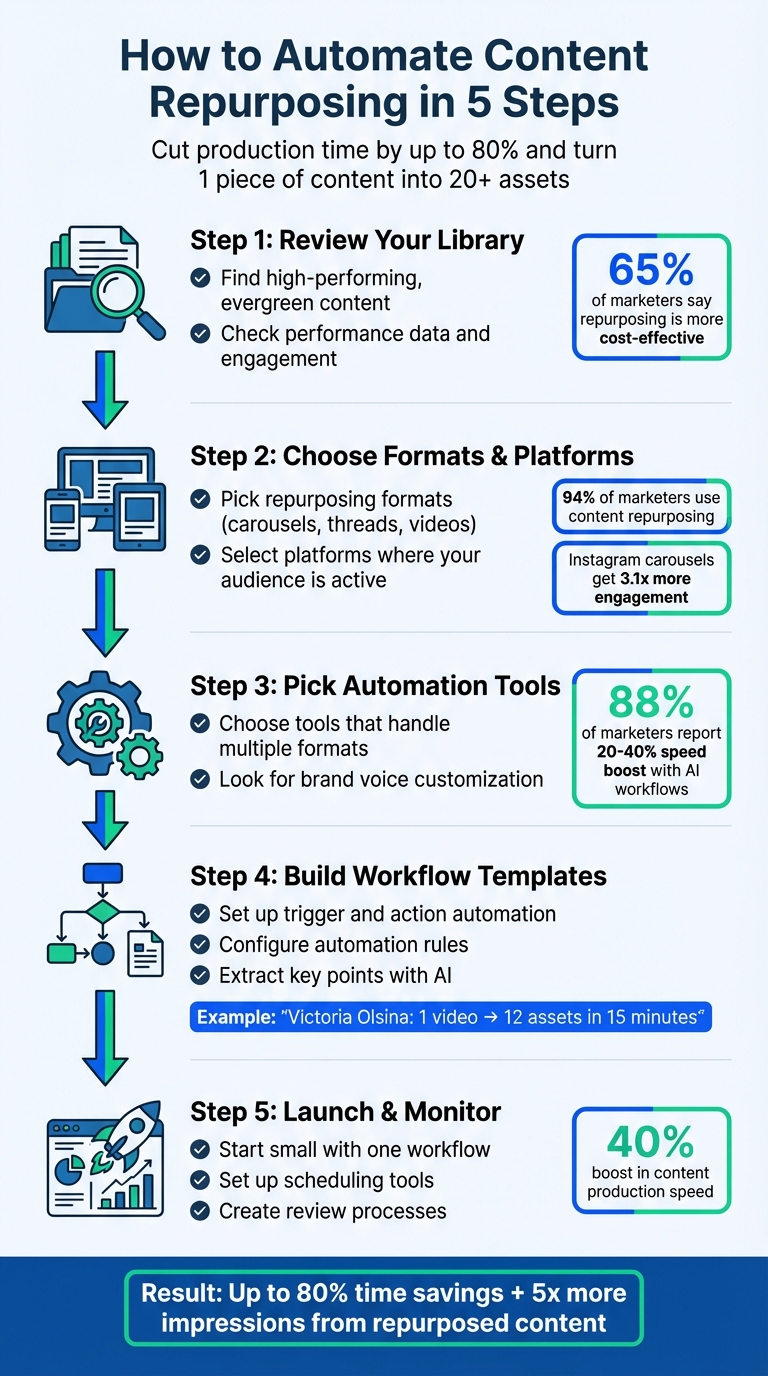
5-Step Content Repurposing Automation Workflow
The Content Multiplier: Building Smart Repurposing Workflows with AI and Automation
sbb-itb-6893d99
Step 1: Review Your Content Library
Start by taking a close look at your content inventory to identify pieces that are ideal for repurposing. Focus on assets that have already proven to connect with your audience and support your brand’s message.
65% of marketers report that repurposing content is more cost-effective than creating new material from scratch. By reusing content that has already performed well, you can save time and resources while maximizing its value.
Find Evergreen Content
Evergreen content is one of the most valuable resources in your library. These are pieces that stay relevant over time, such as how-to guides, glossaries, case studies, and "what is" explainers. Unlike news articles or trend-driven posts, evergreen content continues to attract readers long after it’s published.
"Evergreen content is like that unicorn blog post… that people still go back to because they absolutely must know ‘how to write a meta description.’" – Katlyn Edwards, Writer, Search Engine Land
Look for pillar content – in-depth pieces (typically 1,500+ words) that can be broken into smaller, more digestible formats. For instance, a detailed guide on email marketing could be transformed into a video series, an infographic, or a collection of social media posts. Use tools like Google Trends to confirm that your topic maintains steady interest throughout the year, avoiding those with random spikes or declining relevance.
Once you’ve identified your evergreen content, evaluate its performance to ensure it’s worth repurposing.
Check Performance Data
Performance metrics are your guide to understanding what content resonates most with your audience. Focus on pieces with high organic traffic, strong engagement (like comments and shares), and consistent conversion rates.
"The real gold is often found in the engagement signals – the comments, shares, and conversations that prove a piece of content genuinely connected with people." – PostSyncer
For example, in April 2024, Semrush audited their blog using tools like Domain Overview and Site Audit. By improving underperforming articles, they achieved record-breaking organic traffic. You can do the same with tools like Google Analytics or Google Search Console to pinpoint which pages deliver the most value.
Organize your content into three categories:
- "Repurpose Now" for high-performing evergreen content.
- "Update & Repurpose" for pieces with potential but outdated information.
- "Leave As Is" for time-sensitive or low-performing content.
To keep your repurposing strategy effective, conduct this type of audit every 3 to 6 months.
With your content library reviewed and sorted, you’re ready to decide on the best formats for repurposing.
Step 2: Choose Your Formats and Platforms
Once you’ve identified your top-performing content, the next step is deciding how to reformat and share it effectively across different platforms.
Recent data shows that 94% of marketers incorporate content repurposing into their strategies, and brands averaged 9.5 social posts per day across networks in 2024. To maximize reach, think about how to adapt your content for specific platforms.
Pick Repurposing Formats
Break down larger, cornerstone content into smaller, platform-friendly pieces. For instance:
- A blog post can be transformed into a LinkedIn carousel, an X thread, an infographic, or even multiple short video scripts.
- A webinar can yield short video clips, quote cards, an FAQ page, and a blog summary.
As Stefan, Founder of Automateed, puts it:
"If content was valuable enough to create once, it’s worth remixing and redistributing multiple times."
– Stefan, Founder, Automateed
Focus on formats that deliver the best results. For example, short-form videos consistently perform well, and Instagram carousels generate 3.1x more engagement compared to text or single-image posts. You can also use the "Angle Bank" approach to reframe content into engaging formats like "Mistakes to Avoid", "Myth Busting", "Before/After", or "Step-by-Step Checklist".
Start with your "wins" – content that’s evergreen or already proven to drive engagement through metrics like saves, comments, or watch time.
Once you’ve chosen the formats, match them with the platforms where your audience is most active.
Select the Right Platforms
The best platforms for repurposed content are the ones where your audience spends the most time. Use native analytics tools to identify where your engagement is highest.
Keep in mind that each platform has its own tone and style. Here’s a quick breakdown:
- LinkedIn: Great for professional storytelling, B2B case studies, teaching carousels, and mini-essays.
- X (Twitter): Ideal for concise insights, tech-heavy content, and thread-style posts.
- TikTok, Reels, and Shorts: Perfect for 15–60 second clips that highlight a single insight or bust a common myth.
For tech-related content, X and LinkedIn often outperform more visual platforms.
Freelance writer Anna Burgess Yang provides a great example. Over 18 months leading up to June 2023, she tripled her LinkedIn following to 4,500 by repurposing her Medium articles into two daily LinkedIn posts.
Think of platform selection in tiers:
- Tier 1: Owned channels like your blog or email list, where you have full control.
- Tier 2: High-discovery platforms such as TikTok, Instagram, and YouTube.
- Tier 3: Niche spaces like LinkedIn, Reddit, and industry forums for targeted engagement.
The key is to prioritize platforms where your audience is already active and engaged.
Step 3: Pick Your Automation Tools
Now that you’ve nailed down your formats and platforms, it’s time to find the right tools to make your workflow smoother. A good automation setup can save you massive amounts of time – up to 80% – and 88% of marketers have reported speed boosts of 20–40% after introducing structured AI workflows. Here’s how to choose tools that will make repurposing content easier and more efficient.
What to Look for in Tools
The best tools can handle a variety of input formats (like URLs, PDFs, video transcripts, or audio files) and are tailored to meet specific platform requirements, such as LinkedIn’s character limits or TikTok’s video length restrictions. Bonus points if the tool integrates with scheduling platforms like Zapier or Make.
To ensure your content feels authentic and cohesive, look for tools that allow customization based on your style guides or brand voice. Some advanced options even offer features like virality scoring, which predicts which clips are likely to perform best in terms of engagement.
Efficiency is key. A tool that automates 90% of your workflow is far more valuable than one that only takes care of 60%, as every manual step adds friction. As Jasper and Optimizely emphasize:
"AI speeds up the workflow, but your edits preserve quality".
Tool Comparison Table
Here’s a quick look at some popular tools, their strengths, and their pricing:
| Tool | Best For | Key Features | Starting Price |
|---|---|---|---|
| Repurpose.io | Video/audio distribution | Auto-resizing, watermark removal, multi-platform publishing | $32/mo |
| Descript | Text-based media editing | Edit video/audio by editing text, filler word removal | $24/mo |
| Opus Clip | Short-form video clips | AI highlight detection, engagement scoring, auto-captioning | $19/mo |
| Castmagic | Podcast repurposing | Extracts show notes, transcripts, social posts from audio | $23/mo |
| Jasper | Multi-format marketing copy | Brand voice training, templates for ads and social posts | $39/mo |
| Postiv | LinkedIn content | URL/PDF ingestion, carousel designer, LinkedIn scheduling | $99/mo |
| Canva | Visual design | Magic Switch for resizing, carousel templates, Brand Kits | $15/mo |
For example, Repurpose.io has been used by over 650,000 creators to repurpose more than 21 million videos. Digital marketing strategist Molly Mahoney shares:
"Not only does it allow me to seamlessly turn one video into over 15 pieces of content, it will then publish the content automatically, saving me and my team hours every week".
If you’re focused on video, Opus Clip is great for identifying viral moments, while Descript makes editing easy by letting you tweak video by editing the transcript. For written content, tools like Jasper and Postiv excel at generating platform-specific copy while staying true to your brand voice.
The right tool depends on your content type and the platforms you chose in Step 2. For instance, a single 45-minute podcast can turn into 6,000–8,000 words of text, 5–10 quotes, and 3–5 video clips. Choose tools that align with your goals and simplify your workflow.
Step 4: Build Your Workflow Templates
With your tools ready, it’s time to create templates that simplify repetitive tasks. These templates guide your automation process for each content publication, helping you shift your energy from tedious manual work to more strategic, creative efforts.
Effective workflows rely on a "Trigger and Action" setup. For instance, you could use your blog’s RSS feed as a trigger in Zapier, which then sends new posts to ChatGPT for summarization. The summarized content can then be forwarded to Trello for review – streamlining the entire process.
Configure Automation Rules
Start by identifying the trigger events that will kick off your automation. Common triggers might include a new RSS feed item, a YouTube video upload, or a post going live on LinkedIn. Once you’ve identified these, map out how your content will be repurposed into different formats.
Incorporate a review step into your process to ensure quality and consistency. Tools like Slack, Trello, or even a drafts folder can help with this. As freelance writer Anna Burgess Yang puts it:
"Automation takes the thinking and planning out of this process. It adds the follow-up repurposing tasks to a project management tool, with a specific date for publishing."
To make sure your content feels natural and aligned with your brand, include a "style system" variable in your workflow. This variable should capture your personality guidelines, preferred formatting, and a list of words or phrases to avoid – like "delve", "utilize", or "revolutionize." This small step can transform generic AI-generated content into something that feels personal and authentic.
Extract Key Points with AI
Once your workflows are structured, you can use AI to pull out the most important elements of your content – such as timestamps, quotes, statistics, frameworks, and key takeaways. Think of AI as a tool to turn raw material (like video transcripts or blog posts) into polished, platform-specific drafts.
For video content, tools like Apify’s Transcript Ninja can extract YouTube transcripts at an affordable cost (around $0.01 per video). You can then feed these transcripts into ChatGPT or Claude with detailed instructions, such as: "Extract the five most actionable tips from this transcript and format each as a standalone LinkedIn post." The more precise your prompt, the less time you’ll spend editing later.
Take inspiration from content creator Victoria Olsina, who developed a Make.com workflow in February 2026. Her system transforms a single YouTube video into 12 different assets – like LinkedIn articles, Medium posts, and newsletters – in just 15 minutes. She combines Apify for transcripts with a custom "style system" prompt to keep her brand voice consistent across both Argentinian Spanish and English content.
You can also extract themes from article headers and turn each one into a unique social media post. For example, a 45-minute podcast can yield 6,000–8,000 words of text, 5–10 quotable moments, and 3–5 video clips. By instructing your AI to focus only on the most relevant content, you can cut down on editing time and maximize efficiency.
Step 5: Launch and Monitor Your System
Start small by automating a single workflow to keep things manageable. For example, focus on turning blog posts into social media updates instead of launching multiple automations at once. This makes it easier to identify and fix any issues as they arise.
Using the templates you’ve created, route your automated content to a project management tool like Trello, Notion, or Asana before it goes live. This creates a checklist for review, ensuring that quality and timing remain under your control while still benefiting from automation.
Set Up Scheduling Tools
Once your first automation is running and drafts are queued for review, it’s time to manage their publishing schedule. Use tools like Buffer, SchedulePress, or Brevo to save automated content as drafts instead of publishing it immediately. This gives you a chance to adjust posting times, add platform-specific hashtags, or refine the text before it’s shared.
For video content, especially on LinkedIn, automate the native upload process rather than simply sharing links. Native videos tend to perform better in terms of reach. Tools like Make.com can handle the download and re-upload process automatically. If you’re working with large files (9–10 MB), include a "sleep module" in your workflow to avoid API timeouts.
Create Review Processes
Automation doesn’t mean skipping human oversight. Dedicate time each week to review and finalize automated drafts. During this review, check for consistency in brand voice, platform-specific formatting, and factual accuracy. For critical content, aim for AI to handle 50–80% of the work, leaving the rest for human editing to ensure it meets your standards.
Keep an eye on your review backlog – the time it takes to move drafts from creation to publication. If you notice recurring issues, such as rejecting drafts for the same reasons, adjust your automation rules accordingly. Establish a feedback loop where performance data, like low engagement on certain posts, prompts updates to your AI prompts and workflow setup. Teams with structured review processes have reported a 40% boost in content production speed.
To avoid endless repurposing cycles, store automated outputs in a separate folder or category from the original source files. This prevents your system from continuously recycling the same content.
Conclusion
Automating content repurposing allows you to amplify your reach without putting in extra hours. By following the five steps outlined earlier, you can turn a single piece of content into multiple platform-specific assets, maximizing its value.
Here’s the payoff: these workflows can cut production time by up to 80%, improve efficiency by 20–40%, and boost overall content output by as much as 40%.
Start small – try converting blog posts into LinkedIn updates, for example. Expanding gradually helps you avoid an overwhelming backlog and gives you the chance to fine-tune your automation rules based on actual results. Keep in mind, human oversight is still key to maintaining quality and staying true to your brand voice. This balance is the foundation of the entire repurposing framework.
Repurposed content has the potential to generate up to five times more impressions compared to standalone original pieces. With a reliable automation system, you’ll spend less time worrying about formatting and more time focusing on strategy.
As you get comfortable, you can add more triggers and platforms to your workflow. The aim isn’t to automate everything at once – it’s about building a system that grows with you, delivering consistent results across all your channels.
FAQs
What should I automate first?
To make the most of your content, start by automating its transformation into different formats, like social media posts. For instance, take a single blog post and break it down into multiple social media updates or bite-sized assets. The key is to pull out the main ideas and tailor them to fit the style and requirements of each platform. This approach not only helps you save time but also ensures your content reaches a broader audience without creating everything from scratch.
How do I keep AI content in my brand voice?
Maintaining your brand voice in AI-generated content requires a proactive approach. Start by training the AI on your specific style and tone. To do this, document your brand voice clearly, outlining the language, tone, and personality you want to convey. Use your best-performing content as examples for training, ensuring the AI understands what resonates with your audience.
Creating shared templates is another key step. Templates provide a consistent framework for AI-generated content, reducing the chances of inconsistency. Additionally, involve human reviewers to check for tone and quality, especially for customer-facing or high-stakes material.
Finally, keep your prompts updated regularly. As your brand evolves or audience preferences shift, tweaking prompts ensures the AI stays aligned with your voice. These steps go a long way in preventing "voice drift" and keeping your content authentic and on-brand.
How can I stop my workflow from reusing the same content?
To keep your content fresh and avoid repetition, start by establishing a clear process with specific goals and well-defined themes. Incorporate regular reviews to assess performance and ensure you’re staying on track. Leverage automation tools that include safeguards to help maintain both variety and quality in your output.
Switch up your content by regularly updating themes and rotating formats – this keeps things engaging and prevents monotony. Most importantly, align every piece of content with your overarching strategy to ensure it stays relevant and avoids redundancy.